Pablo Offline AI Take ownership of your AI

A private AI assistant that lives on your computer, not in the cloud — so nothing you say ever leaves your home. Write emails, summarize documents, plan your day, control your lights, and get daily news and weather briefings, all without a subscription. Grab the phone app and take it with you.

Buy Pablo Desktop License — $14.99 One-time. Never expires. Download for Windows Download for Android — Free
End-to-End Privacy
No Account Required
Works Offline
Your Data Stays Local

Desktop and phone

Desktop runs the AI. Your phone connects privately over your network whenever you’re ready.

Pablo Desktop

Windows

Pablo runs on your PC and matches the power you already have. Coding, camera work, wellness, creative writing, and more each go to the right specialist, and you can give every role its own model personality when you want to fine-tune things. Encrypted memory, a large on-device knowledge base, your documents, and smart-home control all live here. Requires a one-time $14.99 license. Download is free — buy your license at pablooffline.com/buy.html.

Fits your hardware Experts for each task Local knowledge base Your files, on-device Encrypted memory Smart home ready One-time desktop license

Pablo Mobile

Android

Chat, widgets, and briefings from your desk, on your phone, without a cloud assistant in the middle. Free on Google Play. Companion to your licensed Pablo Desktop.

Home widgets Briefings Optional Calendar Tailscale Free app

One runtime. Many jobs.

Same privacy story: nothing here needs a cloud model host.

Multi-specialist routing

Pablo doesn't have to use just one AI for everything; it's expandable. You can drop in several specialized AI models for things like Coding, creative writing, etc. and Pablo knows which ones to use and when

Memory on your machine

Pablo remembers your preferences over time, just like a real assistant would. When you tell it to forget something, it's deleted.

Knowledge base

Pablo comes with a built-in library of about two million factual articles and references. When you ask a question, it checks real information first instead of just guessing — so you get answers you can actually trust, no internet needed.

Briefings

Get a quick daily rundown of your weather, news from sources you pick, and your upcoming calendar events — all pulled together by Pablo on your desktop.

Android widgets

Put weather, calendar, news, and a quick-command shortcut right on your phone's home screen. Everything talks to your PC over your private network — glance down and you're caught up.

Smart home on your LAN

Tell Pablo to turn off the lights, dim the kitchen, or flip a smart plug — and it happens instantly over your home network. Works with TP-Link Kasa today, with more brands on the way. No cloud voice assistant listening in.

Turn off the living room lights.
Dim the kitchen to 40%.
Turn on Party Mode.

Your documents

Add files from disk; index and search stay local so you are not uploading sensitive PDFs to an online service.

Local API

REST on port 5177: chat, health, briefings, smart home. Same surface the Android app uses across your LAN.

Built to stay private

Encryption, zero telemetry, and installs that keep working without our servers.

Encrypted at Rest

Your conversations, memories, and personal data are encrypted on disk using military-grade AES-256 encryption. Even if someone copies your files, they can't read them. The encryption key is tied to your Windows account and can't be used by anyone else.

Zero Data Collection

No telemetry. No analytics. No accounts. No tracking. We don't run servers that store your information, which means there's nothing to hack, nothing to subpoena, and nothing to sell. We literally can't see your data.

Yours Forever

Pablo runs on your hardware with no dependency on our company. If we shut down tomorrow, your AI keeps working. No license server to go dark, no subscription to expire, no update that bricks your install. Once it's yours, you own your access to AI. That also matters when cloud policies change, APIs are deprecated, or subscriptions shift under your feet: software you install and run locally stays on your terms.

Verified Downloads

Every AI model and system component Pablo downloads is verified with a cryptographic checksum before it runs. If a file has been tampered with in transit, Pablo rejects it. No backdoors. No compromised binaries.

When You Say Forget, It's Gone

Tell Pablo to forget something and it's permanently erased from your computer, not just hidden. The data is wiped and the freed space is overwritten so it can't be recovered, even with forensic tools. No cloud backup holding onto it. Your delete means delete.

Works Without Internet

Once installed, Pablo runs entirely offline. No internet required for conversations, memory, or smart home control. Disconnect completely and it still works. Perfect for air-gapped environments or anyone who simply doesn't want software phoning home.

No Account Required

No email, no password, no sign-up. Install and use. Pablo Offline AI LLC doesn't know who you are and doesn't need to. There's no user profile on any server because there is no server.

No Training on Your Data

Your conversations are never uploaded, analyzed, or fed into model training. Unlike cloud AI services that improve their models using what you type, Pablo's AI runs locally and your words stay your words. Nothing you say makes someone else's product better.

Pablo vs. Cloud AI Services

Local stack versus a typical cloud chat.

Feature
Pablo
Cloud AI
Data stays on your device
Works without internet
No account required
No monthly subscription
Choose your own AI model
Routed specialist roles (code, vision, wellness, and more)
Pick model size for your hardware; different weights per specialist
On-device memory and local knowledge grounding
Local-only HTTP API on your LAN (port 5177)
No usage limits or throttling
Conversations not used for training

Your Models. Your Rules.

Size models to your machine: lean for battery-friendly laptops, large when you have VRAM. Mix and match specialists without vendor lock-in.

Guided

Wizard reads GPU and RAM, recommends a sane default, then you can swap every specialist later.

BYO

Any compatible GGUF from public hubs. Rebind Coder to a code model, Vision to a multimodal build, Core to a fast generalist.

1,000,000+

compatible models in public repos

Brand icons from Simple Icons (CC0). Trademarks belong to their owners. Qwen is linked to its open ecosystem; tile uses the Alibaba Cloud mark as the closest standard glyph in the set.

What people tune it for

Ship-ready code reviews Screen + photo understanding Wellness and long-form planning Drafts, tone, and creative runs Briefings in your voice Smart home + API scripts

In the apps

Click a shot to enlarge. Escape or the backdrop closes it.

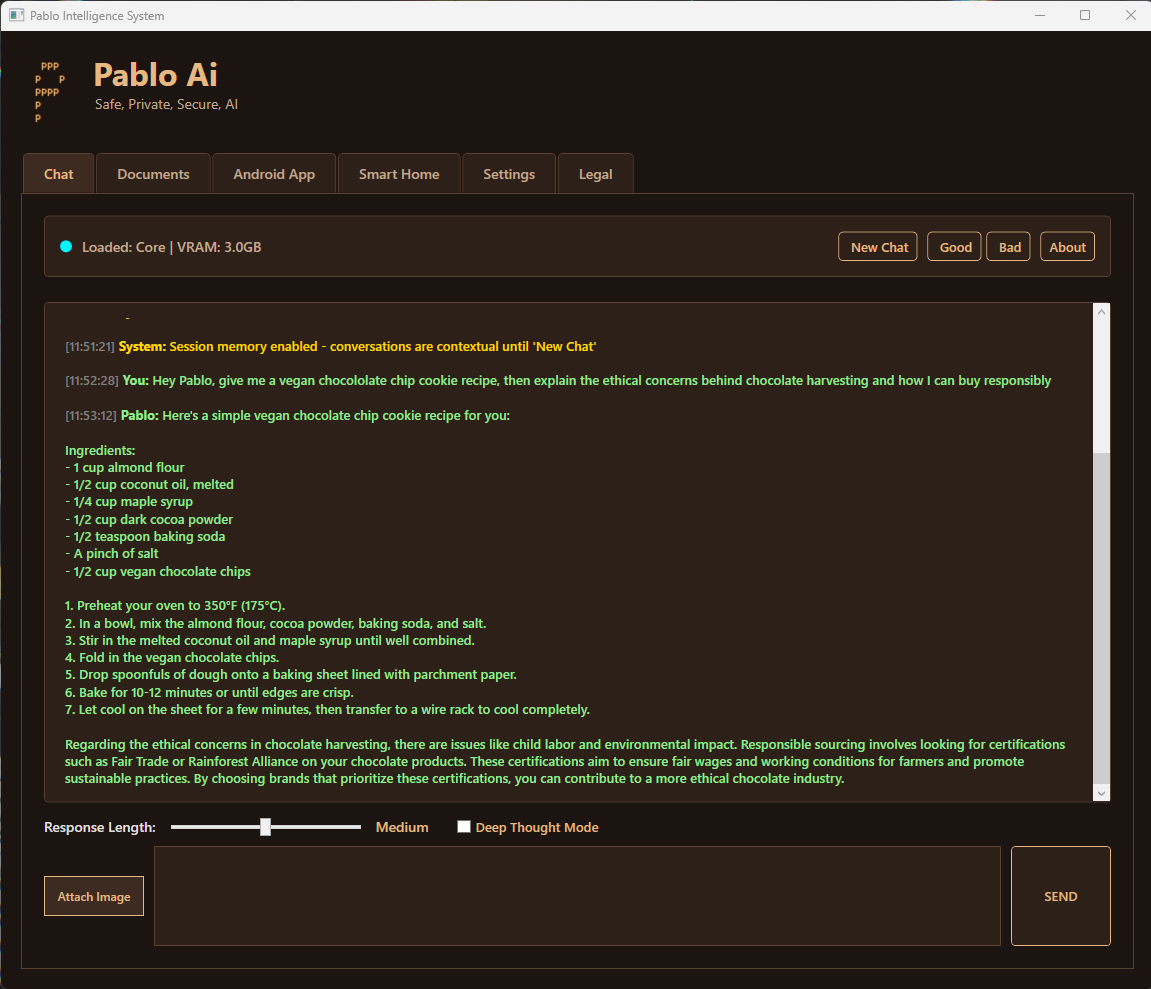
Pablo: local AI chat

Chat

On your hardware. No cloud model host.

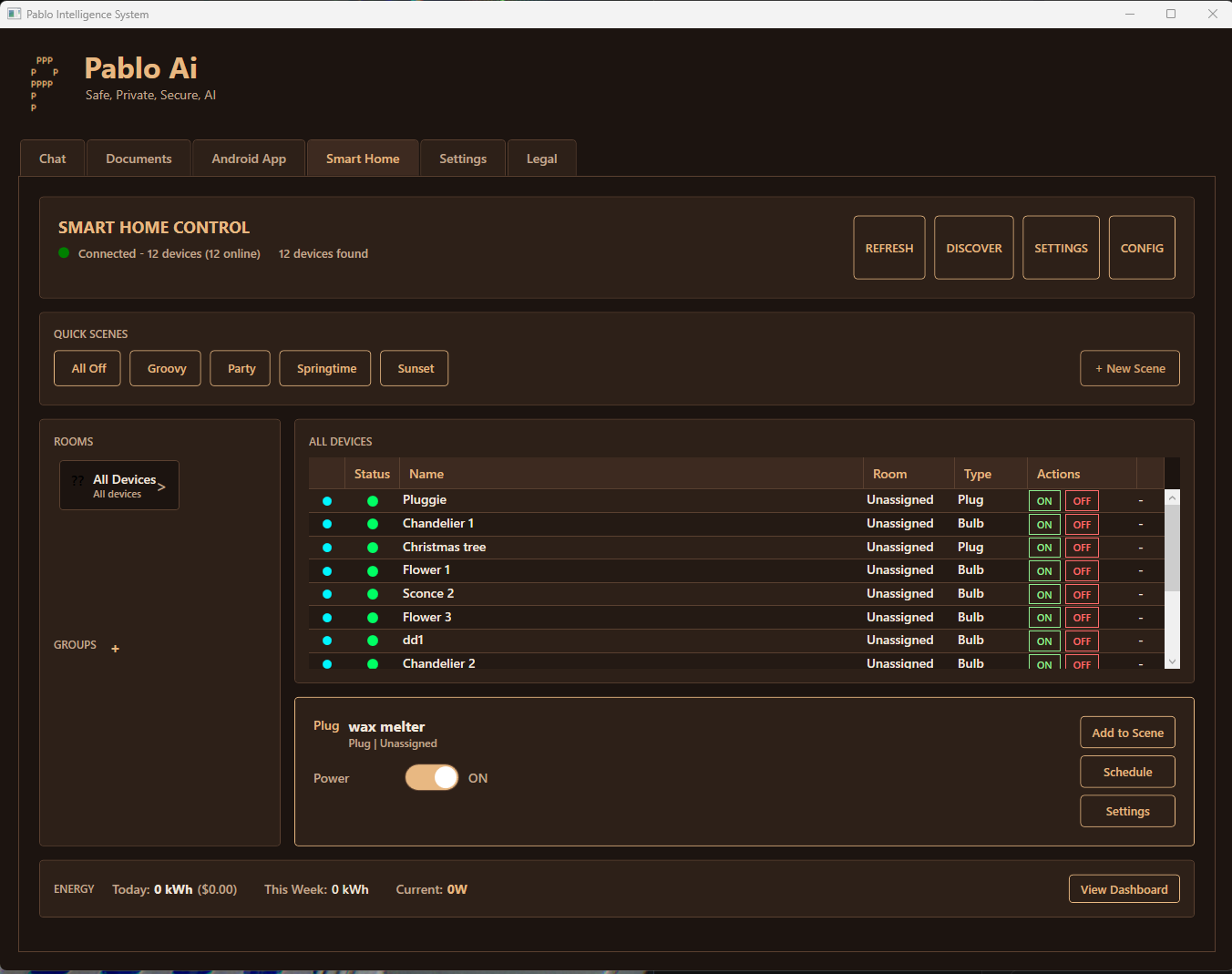
Pablo: smart home control

Smart home

Kasa today. Say it in plain language; it stays on your LAN.

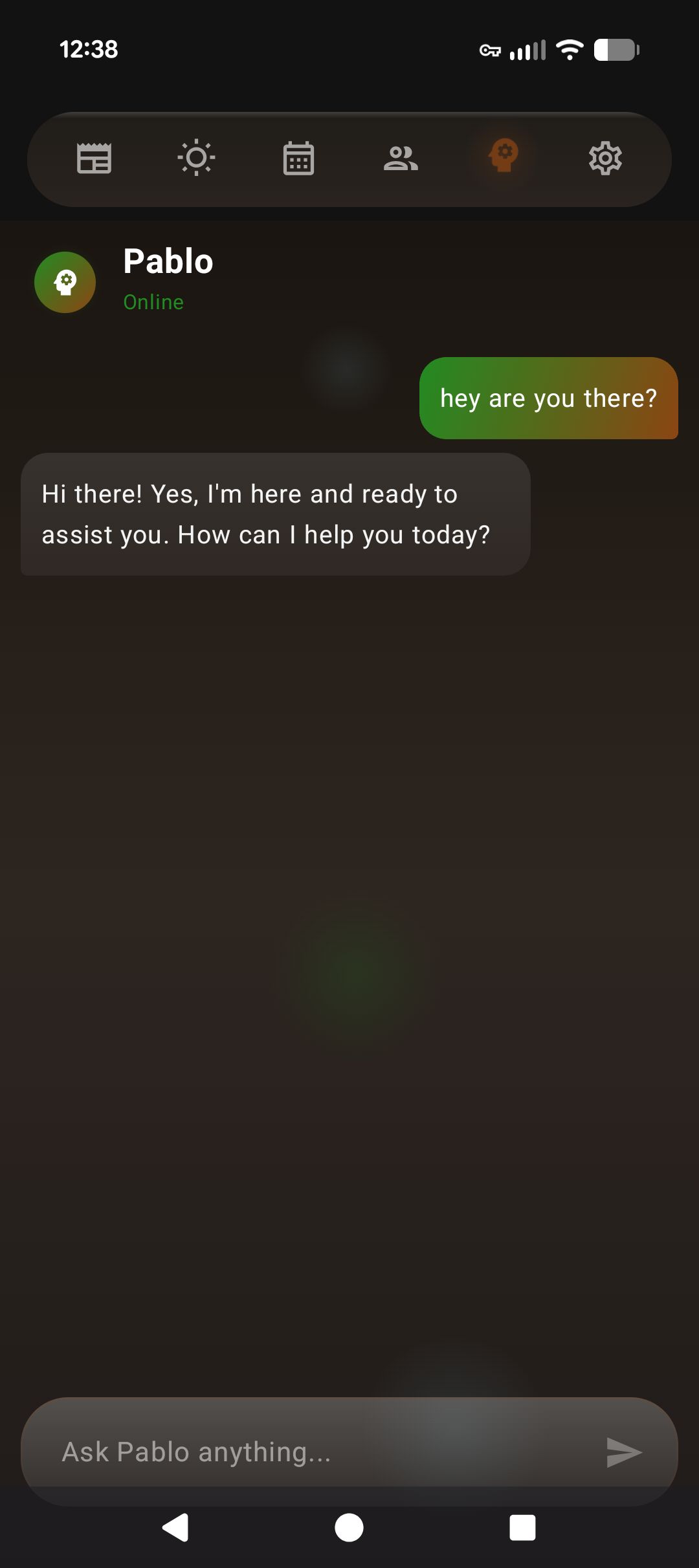
Pablo Mobile app

Mobile

Chat, briefings, widgets. Reach your PC over Tailscale or your LAN.

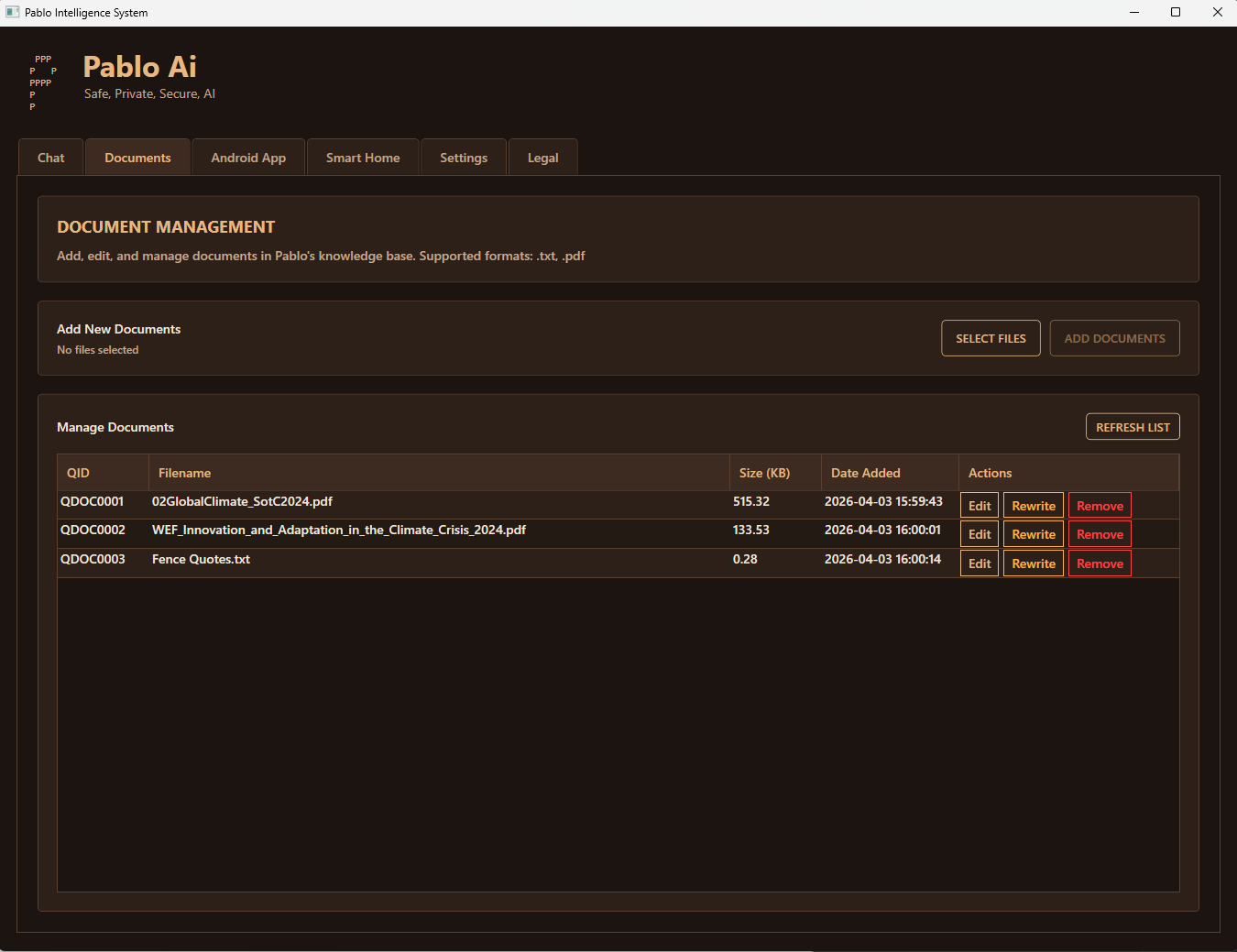
Pablo: document manager

Documents

Index locally. No upload to a hosted chat.

Start on your PC

Download the Windows installer for free, buy a license to unlock the full app, and get the free Android companion from Play.

Questions

What is Pablo Offline AI?

Pablo is a private AI assistant that runs entirely on your Windows PC. It uses local models, routes questions to specialist roles, stores encrypted memory on disk, and can ground answers with a bundled knowledge graph and your own documents. Unlike cloud AI services like ChatGPT or Claude, Pablo requires no account for the core runtime. The installer is free; a one-time license unlocks the full desktop app. The Android companion app is free. There is no subscription.

What are specialists?

Specialists are purpose-tuned AI backends (for example Core, Vision, Coder, Wellness, Creative, Summarizer, and Curator). Pablo's orchestrator picks a path based on what you ask, instead of treating every prompt like a single generic chatbot. You configure which specialists to keep ready; others can load when needed.

Does Pablo work without internet?

Yes. Once installed, Pablo runs completely offline. Conversations, smart home control, and reminders all work without internet. Calendar and weather features require a connection to sync data, but the AI itself never needs the cloud.

Can Pablo control my smart home?

Pablo integrates with TP-Link Kasa smart home devices for light and thermostat control using natural language. Say "turn on the living room lights" and Pablo handles it locally on your network. Additional smart home platforms are planned.

How is Pablo different from ChatGPT?

ChatGPT runs on OpenAI's cloud servers and requires internet. Pablo runs on your own PC. Your conversations are not uploaded for training. Pablo adds routed specialists, on-device memory, local RAG over a large entity store and your files, briefings, optional Google Calendar, smart home control on your LAN, Android widgets, and a local HTTP API — a full private stack, not just a chat box.

What AI model does Pablo use?

Any GGUF-compatible weights you choose, sized to your CPU or GPU. The default install includes Phi-3.5-mini (3.8B) for a quick start. You can assign different models per specialist (for example a code-tuned model for Coder and a vision-capable build for Vision) and swap at any time.

Do I need a powerful GPU?

No. Pablo auto-detects your hardware and configures for NVIDIA GPU acceleration (fastest), Intel with Vulkan, or CPU-only mode. A dedicated NVIDIA GPU with 4+ GB VRAM gives the best experience, but Pablo runs on any modern Windows PC.

Is Pablo free?

Pablo Desktop requires a one-time $14.99 license, purchased at pablooffline.com/buy.html. The download and Android companion app are both free. No subscription. No ads, ever.